Welcome to the first truly long post of my website, in which I go into everything that is required to design an online presence especially well. To prove that the requirements set here can also be met, we use my domain niklas-stephan.de to implement what we learn, as far as possible, directly.
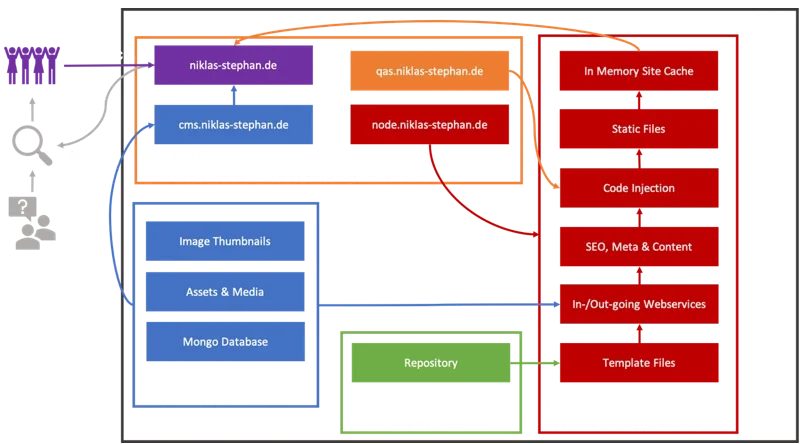
What is perfect?
What is already perfect, and who defines that? In the case of an online presence this question is perhaps easier to answer than in other cases. Because – no matter how well design and implementation have succeeded – the page first has to be found by a visitor. With a market share of over 90 % (https://blog.hubspot.de/marketing/google-trends-suche) the Google search engine is actually the only decisive factor here. So as a conclusion one can say that optimizing a website towards the factors defined by Google simultaneously comes close to a perfect website. Which factors those are, and which further ones still play an important role, we now look at in the first part of our article series.
From the visitor's perspective
Besides much literature and information, Google gives an insight into the criteria it places on a website with the tool "Lighthouse", which is integrated into every installation of the browser Chrome. These are:
- Performance (speed)
- Accessibility
- Best practices
-
Search engine optimization (SEO)
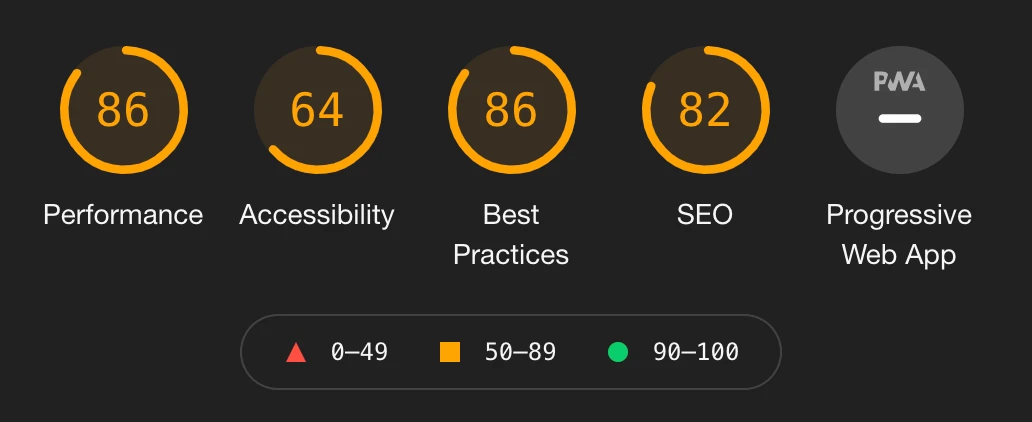
Another point "Progressive Web App" (PWA) also appears in Lighthouse. To make a real web app out of HTML5, after all a large number of requirements must be met. More on that later in another post about my app for home automation. For a website in the actual sense the PWA point is irrelevant anyway. The screenshot here shows a Lighthouse rating of a page frequented thousands of times on the internet, which however obviously does not meet the criteria placed to Google's full satisfaction. This is quite common, or not unusual, because many further factors decide the success of an online presence.
Anyone interested in how this rating comes about can – as said – via the developer tools of Google Chrome (they open with key F12) have any page rated in the "Lighthouse" tab and look at the result. Conveniently Lighthouse also immediately outputs tips alongside on how the score can be raised further, or the page optimized.
Therefore in the next chapters we orient ourselves exactly at these factors.
Performance
Since the transfer speed of the visitor's end device is no longer the limiting factor, websites must feel at least just as "fast" as an application firmly installed on our end device. In its playbook Google therefore gives the urgent advice that a page must be loaded within 2 seconds so as not to diminish the user experience. To stay under these 2 seconds one can use many tuning screws:
- Strong infrastructure / hardware with a good network connection
- As low a data volume of a page as possible
- Compression of files and during data transfer
- Reverse-proxy configuration and caching
- Content delivery networks (CDN) for local caching
- No/little server-side rendering
- "Clean" and economical source code
- Loading afterwards, especially of external content, should as far as possible be foregone
Each of the listed points is worth at least its own chapter, and we will go into them accordingly in our chapter series.
Accessibility
No matter how quickly the page we visit also built itself – if the author thought it was a good idea to display everything in a font size of 5 pixels in light-gray type using a Comic Sans font on a white background, the fun is over. Running texts with phone numbers to copy off and generous use of neon colors are likewise effects that at most increase the propensity to violence. Perhaps not quite so exaggerated, but similarly surely each of us has already made experiences on the internet. To counteract such situations, as a website operator one watches, besides the general user experience (UX), also on the accessibility, i.e. the reachability/accessibility of one's contents. In doing so one should consider:
Not every human can see well
Some people cannot see at all and have the contents read out to them by a machine.
People use different end devices with different resolutions.
The use of possibly confusing effects should as far as possible be foregone if they are not a core element of the page. The page structure should be clear and hierarchical, e.g. not start at the beginning of the page with an h4 heading and then use h2 in the middle of the text. As few as possible, or at least only few measures should be taken that hinder the user from adapting the display to their needs. If one sticks to that, on modern end devices/browsers one is automatically rewarded, through the providing of one's page, with the "Reader" option, which enables e-book-like reading of the articles.
Best practices
There is a series of recommended measures to guarantee the correct display of the page at the visitor and to keep to certain security standards. Besides Lighthouse here also checks that the page contains no obvious errors in the programming and that common as well as current standard techniques were implemented. In total up to 17 criteria are checked, of which I list the most important ones here.
Use of https for the encryption of data transfer between user and operator
Actually already before 2021 an absolute must.
Foregoing JavaScript features that are not necessarily required
No JavaScript errors on the page
Correct formatting of the HTML code regarding essential features such as e.g. the language used. That actually sounds like not much and easy to implement. But anyone who makes the effort to read through the error protocols that are "spat out" by a large number of common websites, wonders not badly. Apparently it is even for large companies only hardly possible to motivate their developers in that direction, such that such errors are excluded. But to defend the developers, above all their motivation, one must however say that various browsers precisely deal with JavaScript differently and sometimes compromises must be made.
SEO
As already explained at the start of the article, the most beautiful website brings us nothing if nobody finds it. If we then are also not willing to reach deep into our pockets to finance advertising campaigns, then we actually must always deal with search engine optimization (SEO). Formerly the optimization for search engines consisted to a large part of bravely embedding a few keywords into the meta information of our presence. That today by far is no longer sufficient, and the assigned keywords are even, as a rule, not noticed at all by the common search engines. Instead now a multitude of other factors are decisive for whether we are found (well) or not. Some of the most important of them are listed here:
- The page contains meta information such as: description, title, image, link, etc.
- The page has a longer real content in text form
- As far as possible all links on the page have a description (text)
- All images on the page have a designation (alt)
- The page is set, e.g. via a robots.txt file, so that it may be indexed by search engines
- The robots.txt, if present, contains no errors
- No "mini" font sizes are used to fake content (a once widespread trick of unscrupulous providers)
- The page/post contains internal and external links to other pages
As one sees, these criteria aim at that, besides the meta information which is also relevant for social networks, the complete page content is considered at the indexing of the page by search engines. That is also a further argument – besides performance – against loading content dynamically, because precisely those then are not found by Google & Co.
Social media
From the perspective of a company today almost necessary for survival, from the perspective of a private person simply a helpful support to make contents known and share them with the world: social media integration for a website. The meta information already named before enables that, when sharing a link, an image, a headline and a short description are generated automatically. Besides buttons with the symbols of the various networks near a post encourage sharing. One can also consider that depending on the end device different channels are used. So a share button to WhatsApp as a rule only makes sense for mobile end devices. Also different age groups prefer different networks. One can orient oneself at this:
- Facebook: used primarily by people of middle to higher age, but surely known to everyone as a pioneer.
- Instagram: Young adults to people of middle age use this network mainly for sharing images and stories to them.
- TikTok: For the very young fellow humans. There surely mainly is danced, clapped and sung along, to then also share the whole thing as a video.
- Twitter (X): for the exchange of short messages, and became worldwide really known during the so-called Arab Spring. Until recently also the home seat of an orange duck. Target audience nowadays is rather people of middle to higher age.
- YouTube: with some effort also usable as a social network, but for that used across age groups.
- WhatsApp: rather for personal exchange in smaller target groups, but likewise across age groups.
Naturally there are also regional differences in the use of the networks, so in China or India the picture looks quite different again. E.g. there the provider WeChat appears with its app as a jack of all trades.
Browser compatibility
Here one must make a decision. Unfortunately many people still use the utterly outdated internet browser "Internet Explorer" (IE11) from Microsoft. For a longer time this is no longer developed further by Microsoft and was replaced by "Edge". Since now many nevertheless still use IE11, the decision to be made is: do I also serve these visitors with an error-free display, or do I exclude them so that I can keep to current standards when creating the page and don't have to consider various legacy burdens? I decided against the support of IE11, since even Microsoft, after support end of Windows 7 to which IE11 is coupled, plans to classify this as a security risk. The other usual browsers such as Google Chrome, Chromium and Microsoft Edge, or also Apple Safari, always deliver good results. The open-source project Firefox of the Mozilla group is the choice of the user with a wish for independence. Firefox also displays most contents of the current HTML standard correctly and only supports e.g. some more exotic parameters in CSS not.
User experience and layout
For a company surely not only a sub-point, for me as a private person more a help. Under user experience (UX) the complete user experience the visitor makes during the visit of our website is summarized. To that belongs the layout, or also user interface (UI), of our page as core element. Repeating elements should look the same on all (sub-)pages, and generally during the complete visit a recognizability should be created. So buttons are always to find at the same place, behave identically and look the same. Also the color scheme as well as the complete formatting of the contents should be consistent and appealing. As an entry I have trusted for some years already on the open-source project "Bootstrap" (link) from Twitter. This contains essentially prefabricated CSS (styles) that can be used as desired and, if applicable, also adjusted. Bootstrap meanwhile lost somewhat of its good reputation because it long bet on the JavaScript framework "jQuery". With the current version 5 that is history, and we rejoice over smaller source code at the inclusion.
From the operator's perspective
In the previous chapters we found out what is relevant from Google's perspective at the delivery of a website. Naturally however, besides the requirements from the visitor's perspective, we also have further requirements both as author and as administrator. Some of them I will name here, others later in the article series also go into more depth.
Server
As already described before at the performance point, a fast server with a very good network connection to the internet is one of the core criteria for a performant website. There are many providers for virtual or physical servers. Some of the best known are Hetzner, 1blu, Netcup or Strato. So one has the choice of many options. Increasingly common today, instead of operating one's own server, is the use of resources of a cloud provider. Here Google, Amazon and Microsoft represent the market leaders. From the perspective of data protection, all three providers meanwhile also provide resources from Germany and accordingly keep to the regulations valid here. I personally, however, due to the variable billing am no fan of the cloud providers and prefer to pay a monthly fixed amount that includes all traffic as well as the hardware costs.
Monitoring and alerting
Monitoring, i.e. the surveillance of the server, is not only important in problem cases but also helps to counteract problems already before they occur. For monitoring I use the open-source tool Cockpit delivered with the CentOS operating system, which delivers a smart web interface for most concerns. So automatic updates and a long-term resource surveillance incl. dashboard can be activated there with a few mouse clicks.
Many equate alerting, i.e. the alarming in the error case, with monitoring. That is not quite correct. An alerting can quite completely independently of monitoring be configured and used. So I use e.g. only alerts that send me an e-mail when my website does not return valid content. Whoever that is sufficient for needs no heavyweight software solution to install. Only important: the surveillance should on no account run on the same server system as our website. The reason is clear: if the server fails, it also cannot deliver me e-mails with the info about the failure… Therefore my mails come from a small Raspberry Pi that at home already performed its 24-hour service beforehand. And normally actually no mails come at all, because the server simply does not fail 🙂
Data backup
That a data backup is mandatorily required needs to be explained today luckily to nobody anymore. For the website I use, just as for other components on my server, a multi-layered backup strategy: a daily mirroring of the contents within the server lets me restore contents deleted by accident very quickly. This mirroring is then also the source to transfer the data incrementally secured to the previously mentioned Raspberry Pi at home – exactly speaking to a hardware RAID disk system lying behind it. So I have at least done everything possible to me, to counteract both accidental deletion, a data loss, or a disk failure.
Domain and DNS
The address(es) under which we want to be reachable on the internet are called domains. One secures these for little money at a multitude of providers, once one has found a creative and not already taken name. And exactly there lies the difficulty: most "pretty" names are already assigned, and one really must become creative. Sleeping a night over it before triggering the registration can really help.
The DNS entry is the connecting link on the internet between our registered domains and the IP address of our server. Often providers of domains simultaneously also take over the registration and distribution of the DNS entry for just as little money.
Security
Besides the actually already compulsory use of encryption via https://, which I set up on my server with the open-source tool "Nginx Proxy Manager" (link), one can do more for the security of visitors and us as operators. A large added value for security arose during the implementation as a side product. Since I generate exclusively static pages and forego the use of cookies, the visitor of these pages restricts themselves almost completely to the mere download of files without loading further contents. An exception make the assets (images, documents etc.), but more on that later.
Besides naturally the access to the server should be secured. So a firewall is to activate, and standard ports e.g. for SSH are to avoid. It is also advisable to force, e.g. with the open-source tool Google Authenticator, a two-factor login at the server. An encryption of the data on the server's disks is, if possible, surely also no bad idea. For the root user we additionally deactivate the possibility to log in remotely, and ourselves never execute our commands directly as this one.
Content management system
An increasingly popular practice is the use of a so-called headless content management system (CMS) for data storage, administration and, if applicable, editing posts like this one here. Headless means that the CMS does not provide the data maintained in it directly, but only via web interfaces. That has, besides the advantages of modularization and independence, the preference that we can query our contents for the generation of static pages at any point of our process without being chained to limitations of the CMS itself. For that I use the open-source tool "Cockpit" (link), and after a short familiarization time of perhaps 6 hours I am wildly enthusiastic. The only confusing thing is the name. We remember: our monitoring tool is called Cockpit too. The two have absolutely nothing to do with each other, they simply share the name.
Asset management
In the case of our website our assets are predominantly images. And these we would like to have stored and administered autonomously, similarly to our contents. Besides our asset management system should be capable of automatically creating thumbnails from the images we upload. Luckily our CMS system "Cockpit" (link) can do all that out of the box, and additionally offers web services for access, whose use we are already acquainted with. In Cockpit asset management is an area separated from the CMS, but can also be addressed from there, so that we can upload and insert images directly while writing an article.
Backend
Often in this article I spoke about the generation of static pages. But with what do we actually do that? Here I went an unusual way and use the open-source tool Node-RED (link). Node-RED is a so-called low-code programming environment accessed via the browser. Low-code means that one can depict processes of simple to medium complexity without actual programming. However own functions can also be integrated at any time, of which I also frequently make use. Various process steps can be connected graphically with each other, so that as a side product a flow diagram arises right alongside. I have used the tool for several years already, e.g. for home automation, which reflects the versatility. But there is also a multitude of other tools specialized on the generation of static websites.
Reporting and web analytics
When one puts so much work into the creation of contents and structure, one naturally also wants to know whether and how these arrive at the visitors. Also how many visitors there are at all in which period, and whether they stay longer on our pages, interests us. If our contents are furthermore offered in several languages, or at least also in English or Spanish, then we also want to know where the visitors come from. To answer all these questions there are so-called web analytics tools. Such a tool usually also prepares the answers to these questions graphically alongside. The most known among them is surely Google Analytics, which can be integrated into a website for free. However Google Analytics is not particularly economical from viewpoints of data protection, and also cannot be operated oneself, but falls back on the Google cloud services. As a friend of data protection, instead, the open-source tool "Matomo" (link) proved itself. Besides it can be operated oneself, is nimble, and goes into all named needs. In Matomo one can also set that data is collected only anonymized and e.g. no IP addresses of the visitors are stored.
Data protection and legal provisions
Where we already touched upon the topic of data protection: without going into it towards the website user, it does not go in Germany or the EU. That I decide against the use of any kind of cookies greatly simplifies this part though (keyword: cookie madness). So on the entire website nevertheless a always and easily findable area/link to the data protection provisions must be made available. The good thing however: data protection advocates are not inhuman beings, on the contrary even. They only want to protect us from dishonest business practices of the operators, and are against long complicated "paragraph listing". That means the data protection provisions should be formulated as short and comprehensible as possible. They should furthermore contain no sections that are not relevant at all for the website, and essentially contain the following:
- Which personal data is stored?
- Where is the data stored?
- By whom is the data stored?
- Who is the responsible contact person?
- Who may evaluate the data?
- Which third parties are possibly involved?
- How can a deletion of my possibly stored data by the operator be initiated?
As said, from the list not all points must be relevant, e.g. if no personalized data is stored at all. That means prefabricated texts are not necessarily good, and above all mostly contain passages that should be shortened/removed. Naturally I am no lawyer, and the legal foundations currently change quarterly, but if one sticks to these foundations for data protection, one is surely good with it and acts more considered than many other website operators.
From a legal perspective an imprint must likewise always be available. Here one can quite use templates from the internet, since, in contrast to the data protection declaration, here it is rather our securing towards the user and no service for him. Mandatory details are:
- Responsible for the offering according to § 5 TMG / § 18 MStV
- Content-wise responsible according to § 18 para. 2 MStV
Both details should contain the complete name, an address, and at least an e-mail address. Unfortunately here no arguments from the perspective of data protection for the operator count…
Conclusion and outlook
We now know many criteria that make a perfect website, and can already say that these cannot be implemented like that with a homepage kit or a web content management system such as e.g. WordPress. In the follow-up articles of my series we will however also see that for the implementation partly profound IT understanding is required. Therefore I advise all who don't want to concern themselves so deeply with this subject nonetheless to the use of WordPress. WordPress is a WCMS used millions of times, with which one quickly comes to acceptable results, and whose implementation effort can also be managed by laypeople.
Summarized, the following requirements catalog:
- Hosting (provision) on a nimble server as basis
- A performant network connection of this server to the internet
- DNS entries of our domain(s) at a trustworthy provider
- Virtualization of individual components in so-called containers
- Server monitoring with Cockpit (not the CMS tool)
- Alerting with a suitable lean solution
- A reverse-proxy configuration incl. certificate management with Nginx Proxy Manager
- A backend based on Node-RED for the generation of static pages
- Content and asset management with Cockpit (not the monitoring tool)
- Web analytics with Matomo
- A text editor and access to a shell with Microsoft Visual Studio Code
- HTML5 source code with support of Twitter Bootstrap 5 components (so without jQuery)
- Individual stylesheets with CSS variables
- Vanilla JavaScript (no frameworks like jQuery or Angular) in the frontend
In this order I will also describe the topics in the following articles. To build up somewhat more suspense: a Lighthouse rating of 100 % points in all areas can be implemented – this page here is the proof :-).