---
title: Caddy
url: 'https://www.handtrixxx.com/en/wiki/self-hosted/caddy'
markdown: 'https://www.handtrixxx.com/en/wiki/self-hosted/caddy.md'
lang: en
date: '2023-04-09'
description: 'Caddy Today I describe what a reverse proxy is and why it must not be missing in your Docker landscape. After several years of using both Traefik and the Nginx Proxy Manager as reverse proxy for my Docker containers, I have now landed at Caddy. What bothered me about the Nginx Proxy Manager was tha…'
---
# Caddy
Today I describe what a reverse proxy is and why it must not be missing in your Docker landscape. After several years of using both Traefik and the Nginx Proxy Manager as reverse proxy for my Docker containers, I have now landed at Caddy. What bothered me about the Nginx Proxy Manager was that for configuration only the web UI is available. That brought me to the limits more often in backup/restore scenarios, which ultimately led to staging a clicking-orgy anew every time. What bothered me about Traefik in turn was the bloated configuration, as well as the many labels that have to be added at every container to be considered. Caddy offers the desired flexibility with a CLI and an API, and is also easy to back up and restore.

## compose.yml file
```yaml
services:
caddy:
container_name: caddy
image: caddy:latest
restart: unless-stopped
ports:
- "80:80"
- "443:443"
- "443:443/udp"
volumes:
- ./Caddyfile:/etc/caddy/Caddyfile
- ./caddy_data:/data
- ./caddy_config:/config
networks:
- caddy
networks:
caddy:
name: caddy
driver: bridge
ipam:
config:
- subnet: 172.19.0.0/16
gateway: 172.19.0.1
```
## Commands
To reload Caddy after making changes to your Caddyfile:
```bash
docker exec -w /etc/caddy caddy caddy fmt --overwrite
docker exec -w /etc/caddy caddy caddy reload
docker exec -w /etc/caddy caddy caddy hash-password -p password
```
## Why a reverse proxy for Docker containers?
Using a so-called reverse proxy for your own (Docker) container landscape should provide on the one hand flexibility and on the other hand increased security. The (virtual) network of the containers is divided into various zones, so that e.g. database instances are not directly reachable from the internet. Also e.g. several WordPress installations can be operated in parallel without getting in each other's way somehow. Both are illustrated in the following diagram:
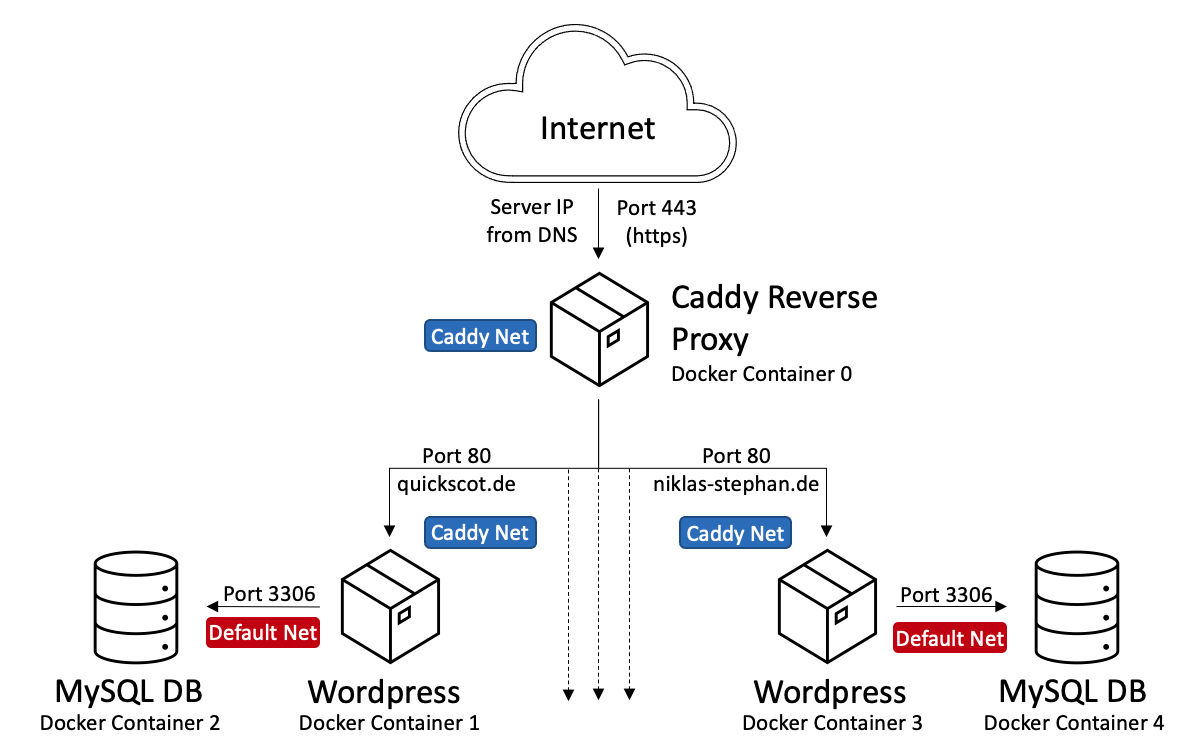
In addition, access to the self-hosted websites should work exclusively via the encrypted HTTPS protocol. The certificates required for that are managed and updated for us fully automatically by a modern reverse proxy solution.
## How do I install and operate Caddy as a reverse proxy?
First we set up a dedicated network for Caddy and the containers that should be publicly reachable under a desired name (here \\"caddy\\") with the following command: `docker network create caddy`. This name only you see in your configuration files and in Docker.
We also provide Caddy itself via a Docker container on which we expose ports 80 and 443. A possible Docker Compose file \\"compose.yml\\" for that can look as shown above.
Before we start the container, we create a file \\"Caddyfile\\" in the same directory. You have to adapt this to your needs; it orientates itself here on the example shown above:
```javascript
{
# TLS Options
email deine.email@provider.com
}
(wordpress) {
header {
Cache-Control "public, max-age=3600, must-revalidate"
}
}
quickscot.de, www.quickscot.de {
import wordpress
reverse_proxy wordpresscontainer1:80
}
niklas-stephan.de, www.niklas-stephan.de {
import wordpress
reverse_proxy wordpresscontainer3:80
}
```
Now we can start the container with the following command: `docker compose up -d`. If something does not work, checking the log file helps with: `docker compose logs`.
For problems a look into the Caddy community also helps, which provides many problem treatments and configuration examples: .
If you make changes or additions to the Caddyfile, you do not have to restart the complete container every time. You avoid downtimes with the following command, which reloads the configuration live:
```bash
docker exec -w /etc/caddy caddy caddy reload
```
## Caddyfile
```json
{
# TLS Options
email niklas.stephan@gmail.com
}
(wordpress) {
header {
Cache-Control "public, max-age=7200, must-revalidate"
}
}
(mail-backend) {
reverse_proxy 172.19.0.1:8085
}
(trusted_proxy_list) {
trusted_proxies 172.19.0.0/24
}
cloud.niklas-stephan.de {
reverse_proxy 172.19.0.1:9200
}
docs.niklas-stephan.de {
reverse_proxy docsniklas-stephande-outline-1:80
}
collabora.niklas-stephan.de {
reverse_proxy 172.19.0.1:9980
}
wopiserver.niklas-stephan.de {
reverse_proxy 172.19.0.1:9300
}
docker.handtrixxx.com {
reverse_proxy arcane:3552
}
node.handtrixxx.com {
reverse_proxy node:1880
}
ac-malchsee.de, www.ac-malchsee.de {
import wordpress
reverse_proxy malchsee-app:80
}
frau-eule.de, www.frau-eule.de {
import wordpress
reverse_proxy fraueulede-app:80
}
new.frau-eule.de {
import wordpress
reverse_proxy fraueule-app:80
}
handtrixxx.com, www.handtrixxx.com {
reverse_proxy handtrixxx:80
}
auth.handtrixxx.com {
reverse_proxy authentik-server:9000
}
home.handtrixxx.com {
reverse_proxy wg-easy:8123
}
music.handtrixxx.com {
reverse_proxy wg-easy:8095
}
keys.handtrixxx.com {
reverse_proxy vaultwarden:80
}
dav.handtrixxx.com {
reverse_proxy radicale:5232
}
mail.handtrixxx.com,
mail.niklas-stephan.de,
mail.quickscot.de,
mail.quicksilvers.de,
mail.ac-malchsee.de,
mail.frau-eule.de {
import mail-backend
}
autodiscover.mail.handtrixxx.com,
autoconfig.mail.handtrixxx.com,
autodiscover.handtrixxx.com,
autoconfig.handtrixxx.com {
import mail-backend
}
webmail.handtrixxx.com {
reverse_proxy roundcube:80
}
stalwart.handtrixxx.com {
reverse_proxy stalwart:8080
}
photos.handtrixxx.com {
reverse_proxy immich-server:2283
}
search.handtrixxx.com {
reverse_proxy search-searxng:8080
}
start.handtrixxx.com {
reverse_proxy heimdall:80
}
desktop.handtrixxx.com {
reverse_proxy webtop:3000
}
vpn.handtrixxx.com {
reverse_proxy wg-easy:51821
}
niklas-stephan.de, www.niklas-stephan.de {
reverse_proxy app:3000
}
quickscot.de, www.quickscot.de, quicksilvers.de, www.quicksilvers.de {
import wordpress
reverse_proxy quickscot-static:80
}
stats.niklas-stephan.de, stats.ac-malchsee.de, stats.frau-eule.de, stats.handtrixxx.com, stats.quickscot.de {
reverse_proxy matomo-web:80 {
header_up X-Real-IP {remote_host}
import trusted_proxy_list
}
}
cdfox.bbraun.io {
handle_path /ext/drawio
```
self-hostedwebservernetwork
---
## Navigation
- Parent: [Self-hosted](https://www.handtrixxx.com/en/wiki/self-hosted.md)
- Previous: [Artalk](https://www.handtrixxx.com/en/wiki/self-hosted/artalk.md)
- Next: [Calibre Web](https://www.handtrixxx.com/en/wiki/self-hosted/calibre-web.md)